Computing
Setup Instructions for X2Go
The X2Go client provides a fast remote desktop to our servers, with disconnect and resume capability.
Instructions
- Install the latest X2Go client
- Windows: Download and install from http://code.x2go.org/releases/binary-win32/x2goclient/
- OS X: Download and install from: http://code.x2go.org/releases/binary-macosx/x2goclient/releases/
- Ubuntu Linux: Install the PPA from https://launchpad.net/~x2go/+archive/stable (client install instructions are at the link)
-
Open the X2Go client program
-
OS X may prompt you to install X11 (10.7 and earlier) or XQuartz (10.8 and later), proceed with installing either package
- Create a new session
- Select Session -> New Session from the file menu, or click the New Session icon from the top left of the X2Go window
- Enter a name for the session (ex. Aurora)
- Enter the server name (ex. aurora.nceas.ucsb.edu)
- Select MATE as the desktop
- Optional:
- Choose your internet connection speed from the Connection tab. The default is ADSL.
- Change your font size on the Input/Output tab, then Set display DPI. The default is 72, increasing the size will result in a larger font (96 dpi is generally good).
- Save
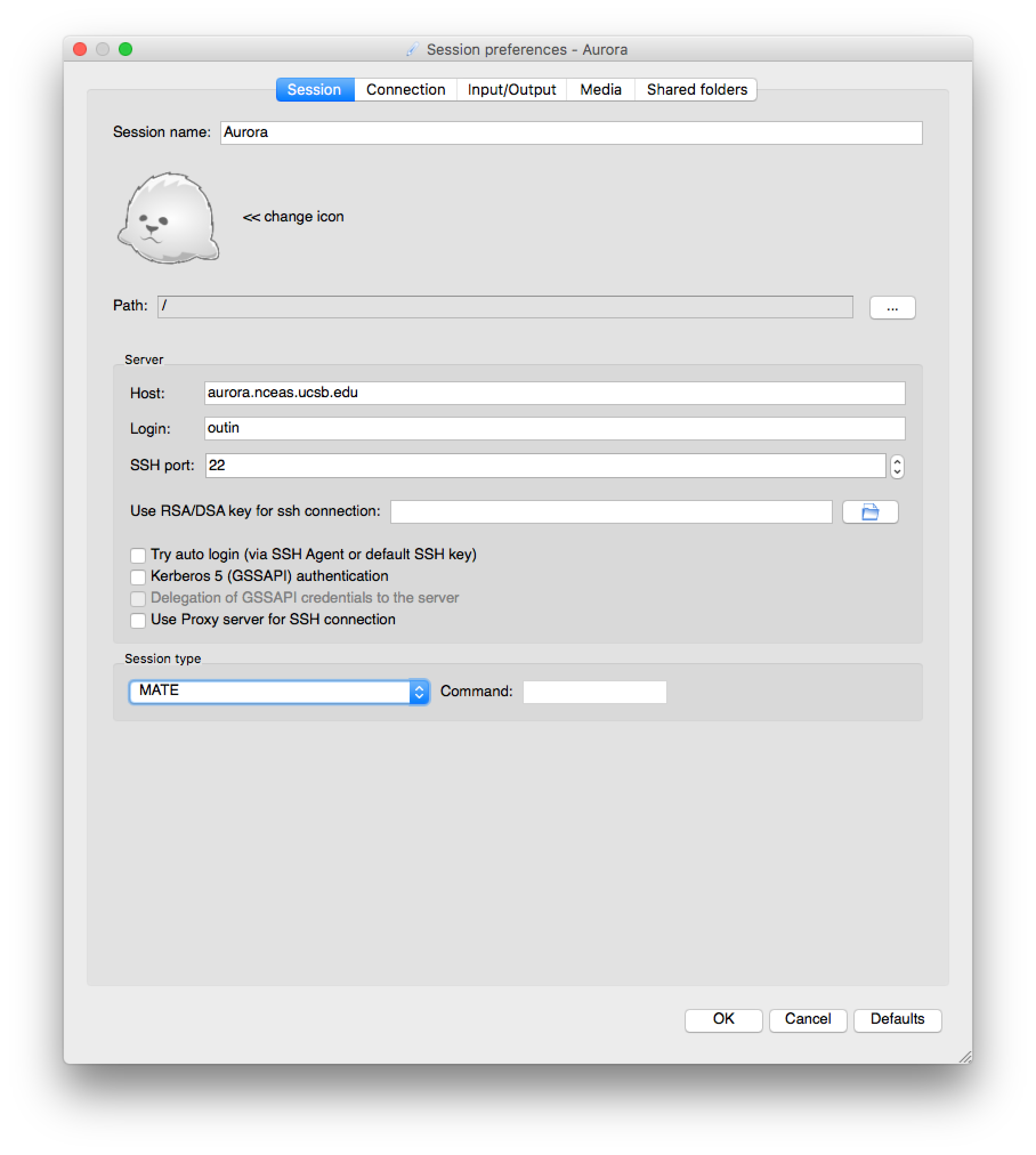
- Connect to the server by clicking on the session box at the right of the window, then entering your username and password.
Published Applications
X2Go can forward the windows of a single application to your computer, without the desktop environment, similar to traditional X11 forwarding. Applications can be suspended and resumed.
- Follow the instructions above, but instead of selecting MATE or XFCE, choose Published Applications and connect to the server
- X2Go will connect, at this point, you can click on the CD icon in the center of the client, underneath Status, and choose an application to launch.
- When finished, use the Suspend or Terminate icons near the application launcher.
Troubleshooting
Performance
If X2Go is sluggish or laggy, make sure you are running the latest client version. If that does not help, try changing the following options in Session Preferences:
- Lower the connection speed
- Disable sound, printing, and shared folder support
- Change the Session Type to Published Applications
If those still don’t work:
- Try the alternate windows client PyHoca-GUI
- Move from Wi-Fi to wired ethernet
- Ping and traceroute aurora.nceas.ucsb.edu. Move to a more stable internet connection if there are long response times (>500ms) and dropped packets.
- Check that Aurora is not overloaded with uptime or top (load averages greater than 32 will generally slow down response times)
- Email help@nceas.ucsb.edu
Connection Problems
The OS X client may have issues reconnecting to a session if kept running. Close both the X2Go client and X11 apps, then open the X2Go client and try connecting again.
Screen Refresh Issues
General Screen Updates
If the screen is not updating, try the following:
- Disconnect and reconnect the session
- Refresh the screen by switching to a different virtual desktop
- Log out of your remote session and restart it (vs closing the X2Go window, which only suspends the session).
- Verify/reinstall the latest client: http://code.x2go.org/releases/
- Change the network speed option. Under the X2Go session preferences, connection, then connection speed. Try both higher and lower settings.